




最新下载


热门教程
- 1
- 2
- 3
- 4
- 5
- 6
- 7
- 8
- 9
- 10
Spring Security实现接口放通代码方法解析
时间:2022-06-29 01:47:11 编辑:袖梨 来源:一聚教程网
本篇文章小编给大家分享一下Spring Security实现接口放通代码方法解析,文章代码介绍的很详细,小编觉得挺不错的,现在分享给大家供大家参考,有需要的小伙伴们可以来看看。
1.SpringBoot版本
本文基于的Spring Boot的版本是2.6.7
2.实现思路
新建一个AnonymousAccess注解,该注解是应用于Controller方法上的
新建一个存放所有请求方式的枚举类
通过判断Controller方法上是否存在该注解
在SecurityConfig上进行策略的配置
3.实现过程
3.1新建注解
@Inherited
@Documented
@Target({ElementType.METHOD,ElementType.ANNOTATION_TYPE})
@Retention(RetentionPolicy.RUNTIME)
public @interface AnonymousAccess {

}
3.2新建请求枚举类
该类是存放所有的请求类型的,代码如下:
@Getter
@AllArgsConstructor
public enum RequestMethodEnum {
    /**
     * 搜寻 @AnonymousGetMapping
     */
    GET("GET"),

    /**
     * 搜寻 @AnonymousPostMapping
     */
    POST("POST"),

    /**
     * 搜寻 @AnonymousPutMapping
     */
    PUT("PUT"),

    /**
     * 搜寻 @AnonymousPatchMapping
     */
    PATCH("PATCH"),

    /**
     * 搜寻 @AnonymousDeleteMapping
     */
    DELETE("DELETE"),

    /**
     * 否则就是所有 Request 接口都放行
     */
    ALL("All");

    /**
     * Request 类型
     */
    private final String type;

    public static RequestMethodEnum find(String type) {
        for (RequestMethodEnum value : RequestMethodEnum.values()) {
            if (value.getType().equals(type)) {
                return value;
            }
        }
        return ALL;
    }
}
3.3判断Controller方法上是否存在该注解
在SecurityConfig类中定义一个私有方法getAnonymousUrl,该方法主要作用是判断controller那些方法加上了AnonymousAccess的注解
private Map> getAnonymousUrl(Map handlerMethodMap) { Map > anonymousUrls = new HashMap(8); Set get = new HashSet(); Set post = new HashSet(); Set put = new HashSet(); Set patch = new HashSet(); Set delete = new HashSet(); Set all = new HashSet(); for (Map.Entry infoEntry : handlerMethodMap.entrySet()) { HandlerMethod handlerMethod = infoEntry.getValue(); AnonymousAccess anonymousAccess = handlerMethod.getMethodAnnotation(AnonymousAccess.class); if (null != anonymousAccess) { List requestMethods = new ArrayList(infoEntry.getKey().getMethodsCondition().getMethods()); RequestMethodEnum request = RequestMethodEnum.find(requestMethods.size() == 0 ? RequestMethodEnum.ALL.getType() : requestMethods.get(0).name()); switch (Objects.requireNonNull(request)) { case GET: get.addAll(infoEntry.getKey().getPatternsCondition().getPatterns()); break; case POST: post.addAll(infoEntry.getKey().getPatternsCondition().getPatterns()); break; case PUT: put.addAll(infoEntry.getKey().getPatternsCondition().getPatterns()); break; case PATCH: patch.addAll(infoEntry.getKey().getPatternsCondition().getPatterns()); break; case DELETE: delete.addAll(infoEntry.getKey().getPatternsCondition().getPatterns()); break; default: all.addAll(infoEntry.getKey().getPatternsCondition().getPatterns()); break; } } } anonymousUrls.put(RequestMethodEnum.GET.getType(), get); anonymousUrls.put(RequestMethodEnum.POST.getType(), post); anonymousUrls.put(RequestMethodEnum.PUT.getType(), put); anonymousUrls.put(RequestMethodEnum.PATCH.getType(), patch); anonymousUrls.put(RequestMethodEnum.DELETE.getType(), delete); anonymousUrls.put(RequestMethodEnum.ALL.getType(), all); return anonymousUrls; }
3.4在SecurityConfig上进行策略的配置
通过一个SpringUtil工具类获取到requestMappingHandlerMapping的Bean,然后通过getAnonymousUrl方法把标注AnonymousAccess接口找出来。最后,通过antMatchers细腻化到每个 Request 类型。
    @Override
    protected void configure(HttpSecurity httpSecurity) throws Exception {
        // 搜寻匿名标记 url: @AnonymousAccess
        RequestMappingHandlerMapping requestMappingHandlerMapping = (RequestMappingHandlerMapping) SpringUtil.getBean("requestMappingHandlerMapping");
        Map handlerMethodMap = requestMappingHandlerMapping.getHandlerMethods();
        // 获取匿名标记
        Map> anonymousUrls = getAnonymousUrl(handlerMethodMap);
        httpSecurity
                //禁用CSRF
                .csrf().disable()
                .authorizeRequests()
                // 自定义匿名访问所有url放行:细腻化到每个 Request 类型
                // GET
                .antMatchers(HttpMethod.GET,anonymousUrls.get(RequestMethodEnum.GET.getType()).toArray(new String[0])).permitAll()
                // POST
                .antMatchers(HttpMethod.POST,anonymousUrls.get(RequestMethodEnum.POST.getType()).toArray(new String[0])).permitAll()
                // PUT
                .antMatchers(HttpMethod.PUT,anonymousUrls.get(RequestMethodEnum.PUT.getType()).toArray(new String[0])).permitAll()
                // PATCH
                .antMatchers(HttpMethod.PATCH,anonymousUrls.get(RequestMethodEnum.PATCH.getType()).toArray(new String[0])).permitAll()
                // DELETE
                .antMatchers(HttpMethod.DELETE,anonymousUrls.get(RequestMethodEnum.DELETE.getType()).toArray(new String[0])).permitAll()
                // 所有类型的接口都放行
                .antMatchers(anonymousUrls.get(RequestMethodEnum.ALL.getType()).toArray(new String[0])).permitAll()
                // 所有请求都需要认证
                .anyRequest().authenticated();

    }
3.5在Controller方法上应用
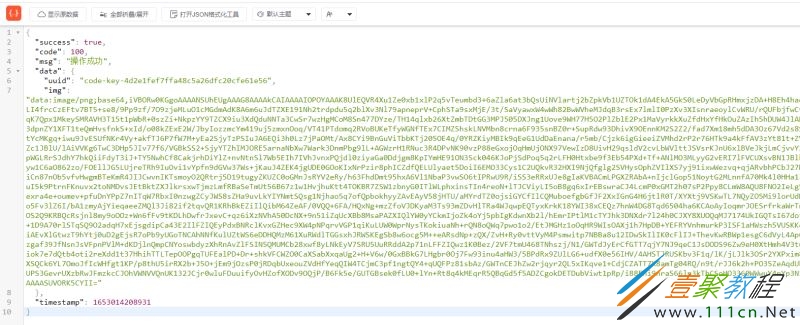
在Controller上把需要的放通的接口上加上注解,即可不需要认证就可以访问了,是不是很方便呢。例如,验证码不需要认证访问的,代码如下:
    @ApiOperation(value = "获取验证码", notes = "获取验证码")
    @AnonymousAccess
    @GetMapping("/code")
    public Object getCode(){

        Captcha captcha = loginProperties.getCaptcha();
        String uuid = "code-key-"+IdUtil.simpleUUID();
        //当验证码类型为 arithmetic时且长度 >= 2 时,captcha.text()的结果有几率为浮点型
        String captchaValue = captcha.text();
        if(captcha.getCharType()-1 == LoginCodeEnum.ARITHMETIC.ordinal() && captchaValue.contains(".")){
            captchaValue = captchaValue.split(".")[0];
        }
        // 保存
        redisUtils.set(uuid,captchaValue,loginProperties.getLoginCode().getExpiration(), TimeUnit.MINUTES);
        // 验证码信息
        Map imgResult = new HashMap(2){{
            put("img",captcha.toBase64());
            put("uuid",uuid);
        }};
        return imgResult;

    }
3.6效果展示
相关文章
- 原神莉奈娅圣遗物推荐 莉奈娅带什么圣遗物 09-08
- 路由器tplink参数是多少(路由器tplink参数详解) 09-08
- 蓝色星原旅谣跳跳稻草人如何 蓝色星原旅谣跳跳稻草人图鉴 09-08
- 蓝色星原旅谣装备评分推荐 蓝色星原旅谣装备哪一套好 09-08
- 野兽领主新世界vip价格表—vip等级一览 09-08
- c语言程序设计软件怎么安装 09-08